
AI Web Scraper Chrome Extension: Extract Website Data Automatically
Rohith
What Is Web Scraping?
Web scraping (also called web harvesting or data extraction) is the automated process of collecting information from websites. In simple terms, a scraper is a program or bot that fetches web pages and extracts specific data for later use. Industry sources define it as “the process of collecting unstructured and structured data in an automated manner”. For example, one guide notes that data scraping “involves pulling information out of a website and into a spreadsheet” for analysis. In practice, a scraper sends an HTTP request to a webpage (like a browser does), then parses the returned HTML or other content to copy out the needed fields. As one summary puts it, scraping is “a form of copying in which specific data is gathered and copied from the web, typically into a local database or spreadsheet”. While anyone can manually copy–paste from a page, web scrapers use code or browser automation to do this at scale, retrieving hundreds, thousands or even millions of data points much faster than any person.
Key points:
- Automated extraction: Web scraping uses programs (often written in Python, JavaScript, etc.) to download pages and extract information automatically.
- Structured output: The data is usually saved in structured formats (CSV, JSON, databases) for analysis.
- Versatile use: Scrapers can target anything visible in a browser – text, images, links, prices, contact details, and more.
- Basis of crawlers: Often a scraper is paired with a web crawler (or “spider”) that follows links to discover pages, then the scraper extracts data from those pages.
Try Clura Free
Extract structured data from any website automatically using an AI web scraper — no coding required.
Add to Chrome — Free →How Web Scraping Works
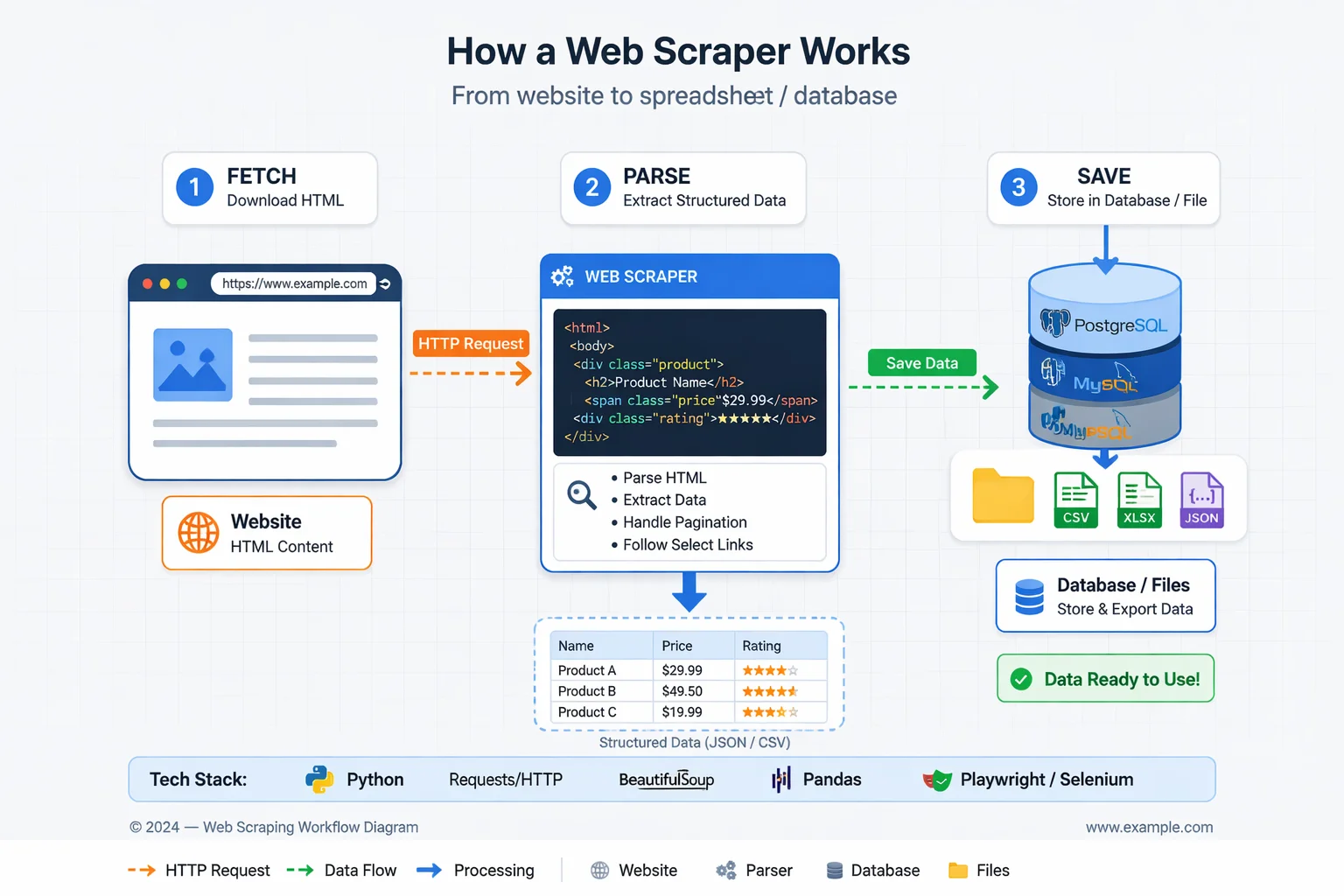
The web scraping workflow generally follows these steps:
- Identify the target website and data. Decide which site(s) and what information to collect (e.g. product prices, news headlines, business contacts).
- Send HTTP requests. Using an HTTP client (like requests in Python), the scraper program requests the web page’s HTML or JSON, similar to how a browser does.
- Receive and parse the response. The website returns the page content. The scraper then parses the HTML (or XML, JSON) to locate the needed data. This often uses tools like CSS selectors, XPath or regular expressions to pinpoint elements in the page’s structure.
- Extract the data. The targeted fields (text, tables, images, etc.) are extracted. For example, a scraper might extract all product names and prices from a listing page.
- Store the results. The collected data is saved in a structured format (CSV, database, JSON). It can then be analyzed or fed into other systems (charts, machine learning, etc.).
These steps can be done manually for small tasks, but scrapers automate the process end-to-end. For simple static sites, a basic script might suffice. But modern websites often have dynamic content (loaded by JavaScript), login requirements, or bot protections. In those cases, scrapers use browser automation tools (like headless Chrome or Firefox) to render the page fully before parsing. For example, Selenium or Playwright can simulate a user’s browser to load JavaScript content, then extract the HTML.
Common challenges in the scraping process include:
- Layout changes: Websites change their HTML layout frequently, which can break scrapers. Maintaining a scraper often means updating selectors when a site redesigns its pages.
- Anti-bot measures: Sites may block repeated requests with CAPTCHAs, rate-limits or IP bans. Scrapers often employ proxies and rotate IPs to avoid blocking.
- JavaScript content: Data generated by JS (e.g. infinite scroll, single-page apps) requires tools like Selenium, Puppeteer or Playwright to fully load and capture the content.
- Robot rules: Ethical scrapers usually respect a site’s robots.txt (which lists disallowed areas) to avoid restricted content.
In practice, developers combine multiple tools to address these. A typical Python-based scraper might use the requests library to fetch pages, then BeautifulSoup or lxml to parse HTML. For JavaScript-heavy sites, one might use Selenium or Playwright to launch a headless browser. In each case, the goal is to automate the fetching and parsing so that vast amounts of data can be collected without manual effort.
Common Tools and Libraries
Web scraping can be done with many programming libraries and tools. Some widely used ones include:
- Requests (Python): a simple HTTP library to download web pages. It handles GET/POST and is often the first step.
- BeautifulSoup (Python): an HTML parser that lets you navigate and search an HTML document easily (using CSS selectors or tag queries).
- Scrapy (Python): a full-featured open-source framework for scraping. Scrapy handles crawling, extracting data (with selectors), and exporting (to JSON/CSV) all in one package.
- Selenium/WebDriver: a browser automation tool (supports Python, Java, etc.). It controls real browsers (Chrome, Firefox, etc.) allowing the scraper to interact with pages and execute JavaScript.
- Playwright or Puppeteer (JavaScript): Node.js libraries for controlling headless browsers. They are optimized for scraping modern websites and can handle multiple browsers and tabs.
- Other languages: R has rvest, Ruby has Nokogiri, and many languages have similar libraries.
- Browser Extensions: Tools like Data Miner or web-scraper.io allow point-and-click extraction in Chrome without coding (for small tasks).
- APIs and Services: Companies like Zyte or ScrapingBee offer web scraping APIs and services. For example, Zyte’s API includes built-in proxy rotation, anti-bot solutions, and even headless browsers to simplify large-scale scraping.
Each tool has pros/cons. For instance, the Requests + BeautifulSoup combination is very common for static pages because it’s lightweight and beginner-friendly. For sites relying heavily on JavaScript, Playwright or Selenium are preferred, with Playwright noted for speed and modern features. Scrapy is powerful for large projects because it manages concurrency and data pipelines out of the box. In short, developers choose tools based on the target site’s complexity: static vs dynamic, scale of data needed, and personal familiarity.
Automate Your Data Extraction
Skip the complex coding. Use Clura to quickly gather structured data from any website.
Add to Chrome — Free →Legal and Ethical Considerations
Scraping the web raises legal and ethical questions. Importantly, web scraping itself is not universally illegal, but how it’s done and what is done with the data can trigger legal issues. Laws vary by country and context:
Terms of Service (ToS): Many websites explicitly forbid automated scraping in their ToS. Violating these terms can lead to breach-of-contract claims. In fact, contracting issues are now the most common legal concern in scraping, since courts (in some regions) no longer consider scraping public data by itself to be computer hacking. For example, LinkedIn’s terms prohibit bots, and the company has sued scrapers for contract breaches. The key takeaway is to review each site’s policy before scraping.
Computer Fraud and Abuse Act (CFAA) (US): In the U.S., the CFAA makes unauthorized computer access illegal. However, a landmark case (hiQ Labs v. LinkedIn) held that scraping publicly accessible data does not violate the CFAA. The Ninth Circuit clarified that simply harvesting public webpages is not “unauthorized access” under the law. This means scraping truly public information (without bypassing paywalls or logins) is generally safe from anti-hacking statutes. The current legal trend is that scraping public data is allowed unless there’s a specific barrier (like a login wall) that’s ignored.
Intellectual Property/Copyright: Scraping content (like copying large text or images) can raise copyright issues, especially if republished without permission. Many jurisdictions allow fair use for non-commercial research or commentary, but commercial use is riskier. In practice, scraping facts (like prices or product names) is low-risk, but republishing creative content (articles, images) may infringe copyrights.
Privacy and Data Protection: Collecting personal data (names, emails, phone numbers) can trigger privacy laws (GDPR in Europe, CCPA in California, etc.). Even if profiles are public, using that data (especially sensitive categories like health or finance) requires compliance. The general advice is to avoid scraping personal or sensitive data unless necessary, and to ensure any collection has a legitimate purpose and consent if required.
Anti-scraping Measures: Actively bypassing technical barriers often crosses the legal line. If a site uses CAPTCHAs, logins or rate-limits to block bots, forcing your scraper through those defenses can be considered unauthorized. For instance, widely-held advice is that you should not break CAPTCHAs or mimic a logged-in session without permission. In short, respect any explicit barriers – scraping behind a paywall or login is much more legally risky than scraping pure public data.
From an ethical standpoint, scrapers should also be considerate of website owners and users:
- Respect robots.txt: This file tells scrapers which pages or directories are off-limits. Ethical scrapers check robots.txt and avoid disallowed areas.
- Rate Limiting: Send requests at a reasonable pace (e.g. 1–2 seconds apart) to avoid overloading a site’s server.
- Identify Your Bot: Use a clear User-Agent string and provide contact info if possible. This transparency can help resolve issues if the site owner objects.
- Data Minimization: Only collect the data you truly need. Do not scrape unnecessary personal information or sensitive fields.
- Permission and API Alternatives: Where possible, use official APIs or datasets rather than scraping. Many sites (like Twitter, Google, etc.) offer APIs. If you do scrape extensively, it’s best practice to ask the site owner or cite them as a source.
In summary, legal risks typically stem from violating site rules, copyright, or privacy regulations. Courts today tend to focus on contracts (ToS) and tech measures: scraping public HTML is usually permitted, but bypassing explicit controls is not. Following best practices (honoring robots.txt, limiting request rates) keeps scraping both ethical and less likely to cause conflict.
Common Use Cases and Applications
Web scraping powers many real-world tasks across business, research and marketing. Typical use cases include:
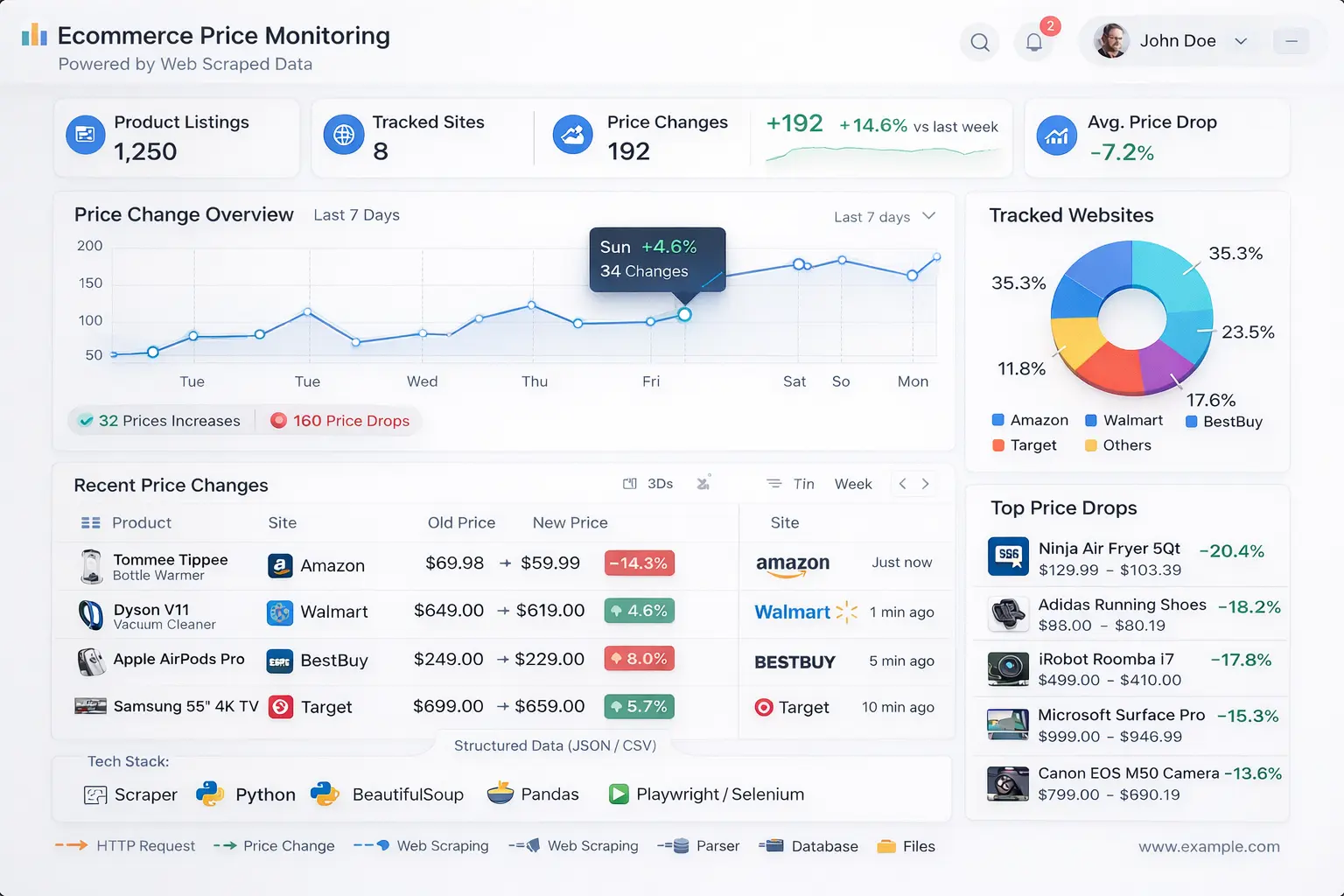
- Price Monitoring / Competitive Analysis: E‑commerce and retail companies scrape competitor product pages and pricing. Automating this process lets them dynamically adjust prices or spot market trends. For example, a retailer might scrape Amazon or eBay to watch competitor prices and update its own listings in response.
- Lead Generation: Sales and marketing teams collect business contact information by scraping directories, LinkedIn profiles, Google Maps listings, etc. Instead of manual searching, they automate gathering names, job titles, emails or phone numbers to build targeted outreach lists.
- Market Research and News Monitoring: Analysts scrape news sites, blogs, forums or social media to aggregate information and sentiment. This helps companies spot emerging trends or public opinion. For instance, journalists have used scraping to compile large text corpora – one project scraped decades of State of the Union speeches for analysis.
- Machine Learning and AI Training: Web data is a goldmine for AI. Scraping can gather images (for computer vision), text (for language models), or other data at scale. As Zyte notes, scraping image galleries for computer vision or text for natural language models is common practice to build large training datasets.
- Academic and Research Projects: Academics scrape public data for studies, from census figures to medical literature. An IRB guide from Stanford defines data scraping broadly as “automated data collection from the internet” and recognizes it as a research method. For example, social scientists might scrape Twitter for public tweet data (while still respecting privacy rules) to analyze public behavior.
- Other Commercial Uses: These include aggregating real estate listings (to analyze housing markets), scraping job boards for recruiting analytics, collecting product reviews for sentiment analysis, monitoring social media metrics, and more. In finance, firms scrape SEC filings or economic indicators; in marketing, brands scrape forums or review sites to track customer feedback.
Multiple industry sources confirm that businesses find scraping invaluable. One article notes that organizations “rely on web scraping services to efficiently gather and utilize data”. Scraping enables data-driven decisions like optimizing prices, discovering new leads, or powering dashboards. As ScrapingBee puts it, “many successful businesses rely on commercial scraping for market research, price monitoring, and competitive intelligence”. In short, if information is online and useful (from price lists to phone numbers), web scraping provides a way to collect it quickly for analysis and action.
Ready to Start Web Scraping?
Extract structured datasets effortlessly. Use Clura to gather thousands of records without writing code.
Add to Chrome — Free →About the Author