
Scrape Dynamic Websites: A Complete Guide for 2026
Rohith
Dynamic websites load content using JavaScript — and scraping them with traditional tools is nearly impossible. If you have ever tried to extract product listings, job postings, or real estate data and ended up with empty results, you have run into this problem: the data you see on screen simply is not in the HTML source that a standard scraper downloads.
The solution is a browser-based AI web scraper Chrome extension that reads the fully rendered page — the same version you see after all JavaScript has executed. This guide explains why dynamic websites are hard to scrape, how AI tools solve the problem, and how to extract data from any JavaScript-rendered site without writing a single line of code.
Scrape Any Dynamic Website — No Code Required
Clura runs inside your Chrome browser and reads the fully rendered page. Install the extension and start extracting data from any JavaScript-powered site in minutes.
Add to Chrome — Free →What Are Dynamic Websites?
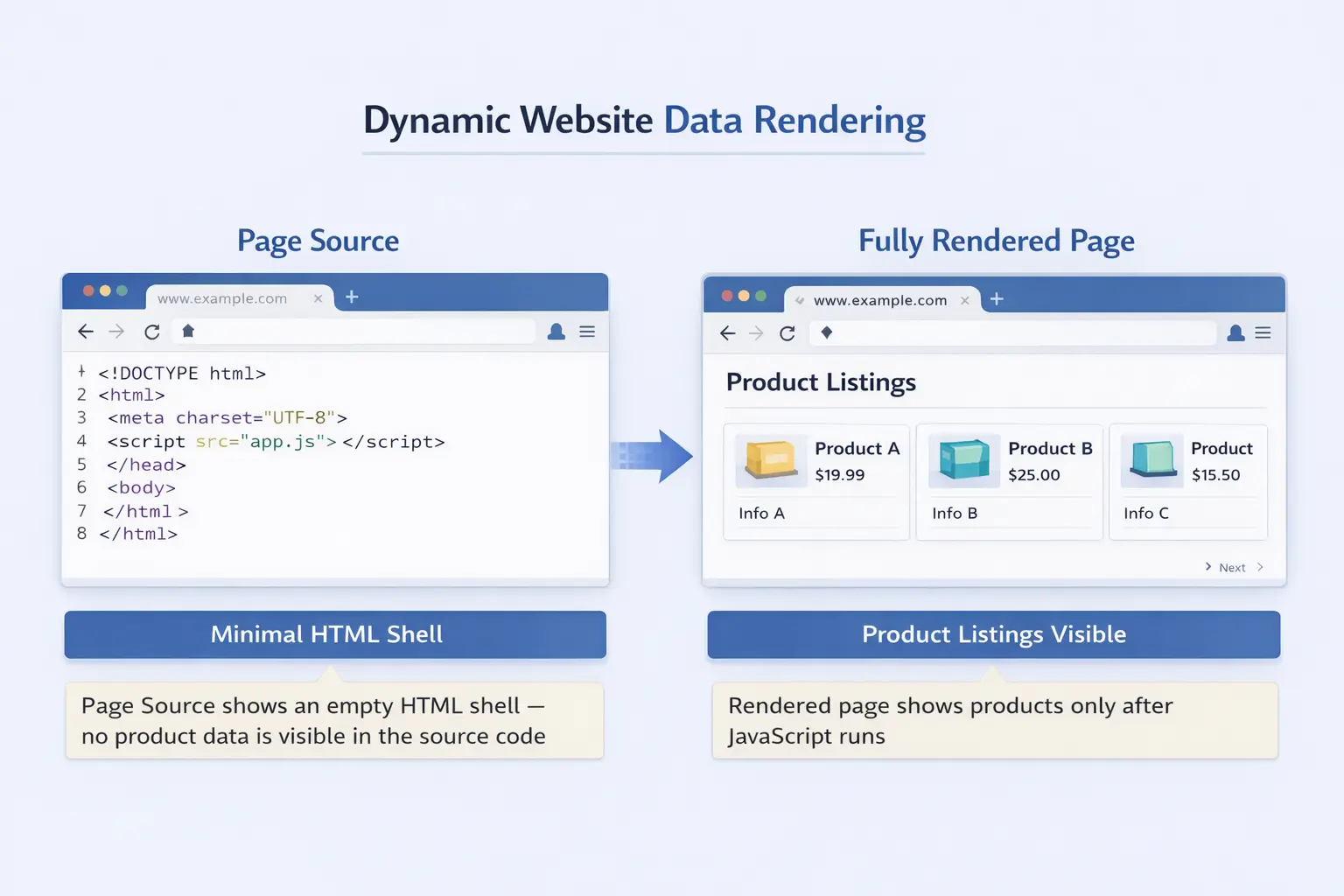
Dynamic websites load content using JavaScript after the initial page request — unlike static websites where all content is embedded in the HTML source — which means traditional scrapers that only read the HTML file receive an empty shell with none of the data you actually want.
When you visit a static website, the server returns an HTML file with every product name, price, and description already inside it. Open the page source and you see everything. Dynamic websites work differently: the server returns a minimal HTML template, then JavaScript runs in your browser, fires off API requests, and populates the page with real content in real time.
This architecture powers most of the modern web. Single-page applications built with React, Angular, and Vue are dynamic by default. So are most ecommerce product pages, job boards, real estate portals, and social media feeds. A reliable sign: right-click, choose "View Page Source," and see little to no actual content. That is a dynamic site.
Why Dynamic Websites Are Hard to Scrape with Traditional Tools
Dynamic websites are hard to scrape with traditional tools because HTTP request-based scrapers download raw HTML before JavaScript executes — the same empty shell a browser shows before the page loads — so the product listings, prices, and other data you actually want are never present in what the scraper downloads.
The most common traditional approach is to send an HTTP GET request to a URL and parse the returned HTML with a library like BeautifulSoup (Python) or Cheerio (JavaScript). This works well for static websites but fails completely on dynamic ones: the request returns the server-delivered HTML template with no content — just a frame — before any JavaScript has run.
Ajax and modern JavaScript frameworks have made this problem far more widespread. A product listing page may load a skeleton UI immediately, then fire off API calls to retrieve product names, prices, and images. By the time JavaScript finishes populating the page, a traditional scraper has already returned empty results.
Some developers try to work around this by intercepting the underlying API calls that populate the page. This requires reverse-engineering undocumented APIs using browser developer tools, handling authentication tokens, and re-implementing request patterns manually. It is time-consuming, fragile, and breaks every time the site updates its API — and for non-technical users, it is simply not an option.
How an AI Web Scraper Handles Dynamic Content
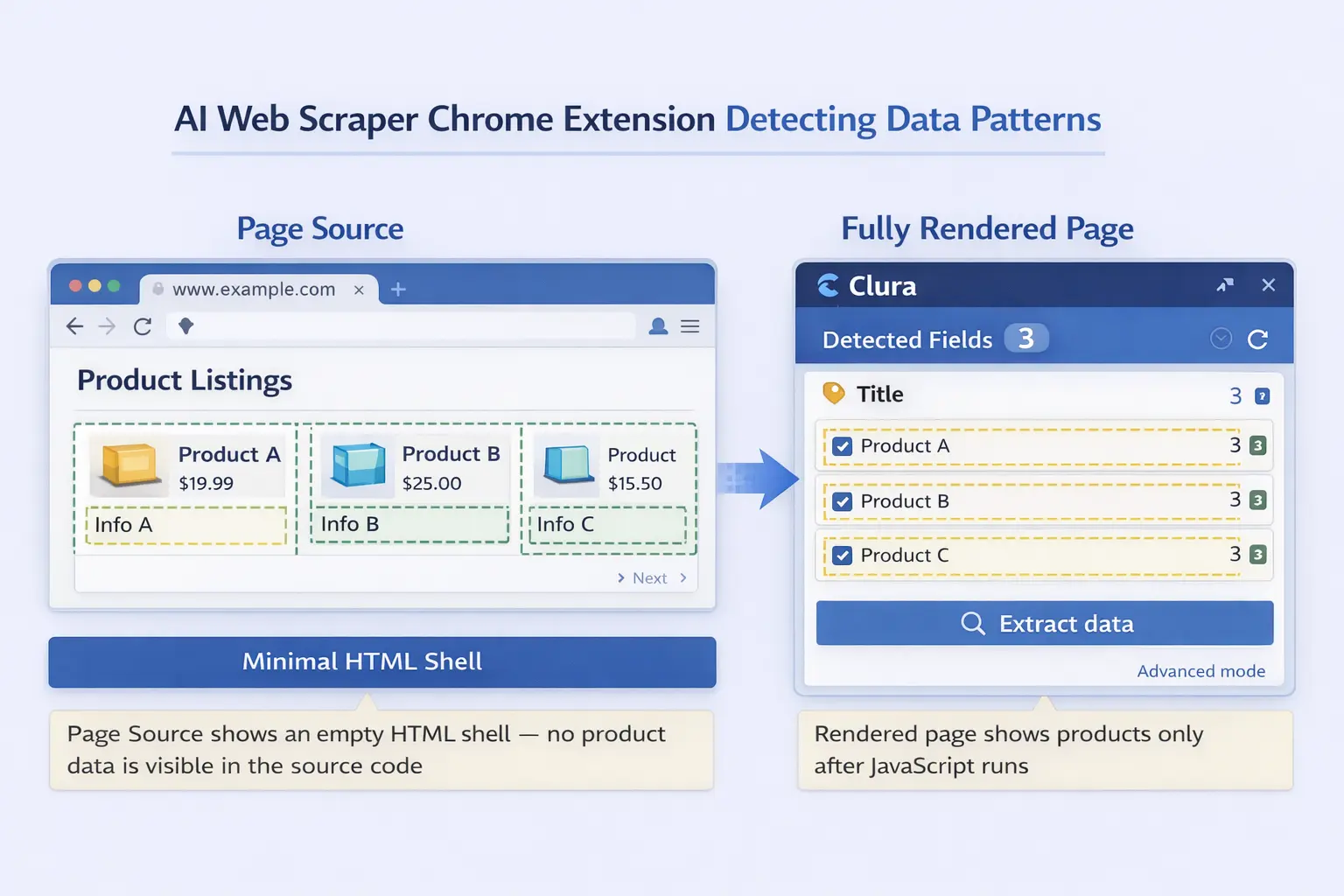
An AI web scraper handles dynamic content by running inside a real browser tab where JavaScript has already executed and the full page is rendered — so it reads the same data you see on screen, regardless of how that data was loaded.
Browser-based scraping tools like Chrome extensions have a fundamental advantage over HTTP-based scrapers: they operate inside a fully functional browser. By the time you interact with the extension, JavaScript has already run, API calls have completed, and the page is fully populated. The scraper reads from the live rendered DOM — not from a raw HTML download.
AI adds another layer on top of browser access. Instead of requiring CSS selectors or XPath expressions to target specific elements, an AI web scraper uses machine learning to understand a plain-language description of the data you want. You describe the fields — "company name, job title, location, and salary" — and the AI identifies the repeating pattern automatically across all matching items on the page.
[ Add screenshot here ]
Suggested file: /public/images/blog/scrape-dynamic-websites-ai-browser.webp
Alt: AI web scraper Chrome extension open on a fully rendered dynamic product listing page, showing detected fields highlighted by the AI
The AI reads the fully rendered page — after JavaScript has run — and detects repeating data patterns automatically.
Extract Data from Any JavaScript-Powered Site
Clura reads the fully rendered page in your browser — no configuration, no selectors, no code. Describe what you want and download clean data in minutes.
Add to Chrome — Free →Step-by-Step: How to Scrape a Dynamic Website with Clura
To scrape a dynamic website with Clura, install the Chrome extension, navigate to the fully loaded page, describe what you want in plain English, and export the results — the AI detects data patterns from the live rendered page, not the raw HTML source.
Step 1: Install Clura from the Chrome Web Store
Add the Clura extension to Chrome. It is free to get started and does not require any account setup before your first scrape.
Step 2: Navigate to the Page with Data Fully Loaded
Open the dynamic website in Chrome and wait for the content to finish loading. For pages with infinite scroll, scroll down to load additional records before activating the extension. For paginated sites, you can start on the first page and configure pagination in Clura. The extension reads whatever is currently rendered in your browser tab.
Step 3: Open Clura and Describe Your Data
Click the Clura icon in your Chrome toolbar to open the extension panel. In plain English, describe the data fields you need — for example: "product name, price, rating, and number of reviews." The AI analyzes the rendered DOM and identifies the repeating pattern across all matching items on the page.
Step 4: Confirm the Detected Fields
Clura highlights the detected data on the page so you can verify it is selecting the right elements before extracting. If anything is off, refine your description and the AI re-detects. This step ensures accuracy without requiring any manual selector editing.
Step 5: Export to Excel, CSV, or JSON
Click extract and choose your export format. Download a clean, structured spreadsheet instantly — ready for analysis, CRM import, or sharing. Whether you need to export website data to CSV or scrape to Excel, both formats are available in one click.
Dynamic vs. Static Websites: Key Differences for Scraping
The key scraping difference is that static websites embed all data directly in the HTML response while dynamic websites populate content via JavaScript after load — making browser-based scrapers mandatory for dynamic sites and optional for static ones.
| Feature | Static Website | Dynamic Website |
|---|---|---|
| Content in HTML source | ✅ Yes — all content visible | ❌ No — mostly empty shell |
| JavaScript required to load data | ❌ No | ✅ Yes |
| Scraping method needed | HTTP request (simple) | Browser-based (full render) |
| Works with simple HTTP scrapers | ✅ Yes | ❌ No |
| Common examples | Wikipedia, news articles, documentation | Amazon, LinkedIn, Zillow, Indeed |
In practice, the boundary between static and dynamic is blurry. Many sites deliver most content in the HTML but use JavaScript for pagination, filters, or "load more" buttons. The safest approach is to always use a browser-based tool when scraping modern websites — it handles both correctly.
If you need to extract data from website tables, keep in mind that pricing grids, comparison tables, and data tables are often rendered dynamically and will not appear in the raw HTML source — another case where browser-based AI scraping is essential.
Common Use Cases for Scraping Dynamic Websites
The most common use cases for scraping dynamic websites are monitoring ecommerce product prices, collecting real estate listings, extracting job postings from career platforms, and generating leads from business directories — all of which rely on JavaScript-rendered content that only appears in the browser.
Ecommerce Price Monitoring
Product pages on Amazon, eBay, and Shopify stores are heavily dynamic. Prices, stock status, review counts, and seller rankings all load via JavaScript. Browser-based AI scrapers capture the full rendered product data — exactly what shoppers see — making accurate competitive price tracking possible without any developer resources.
Real Estate Research
Property portals render listings dynamically, including price, number of bedrooms, square footage, and agent contact details. Manually copying hundreds of listings into a spreadsheet is impractical. AI scraping condenses hours of manual research into a single export you can filter and analyze immediately.
Job Market Intelligence
Job boards populate postings via API calls triggered by JavaScript. LinkedIn, Indeed, and Glassdoor all fall into this category. Sales and recruiting teams scrape these platforms to build lead lists, track hiring trends, and identify fast-growing target companies — data that is publicly visible but impossible to collect manually at scale.
Lead Generation from Directories
Business directories, startup databases, and professional platforms render contact details, company descriptions, and social links using JavaScript. These are ideal sources for AI scrapers to populate CRM systems with qualified leads automatically — replacing manual research with a structured, repeatable workflow.
Frequently Asked Questions
What is a dynamic website?
A dynamic website loads content using JavaScript after the initial page request, rather than embedding all data in the HTML source. Common examples include Amazon product pages, LinkedIn job boards, and Zillow real estate listings — all of which use JavaScript to fetch and render content after your browser loads the page.
Can traditional scrapers scrape dynamic websites?
No. Traditional scrapers send HTTP requests and parse raw HTML before JavaScript executes, so the content you want — product listings, prices, job postings — is never present in what they download. You need a browser-based scraper that reads the fully rendered page after JavaScript has run.
Do I need to code to scrape dynamic websites?
No. Browser-based AI scrapers like Clura work as Chrome extensions. Navigate to the fully loaded page, describe the data you want in plain English, and download the results. There is no code, configuration, or technical knowledge required at any step.
What types of sites use dynamic content?
Most modern websites use dynamic content to some degree. The most common examples are ecommerce platforms, professional networks like LinkedIn, real estate portals, job boards, and social media feeds — any site where content loads or updates without a full page refresh.
Is scraping dynamic websites legal?
Scraping publicly visible data for personal or business research is generally accepted. Scraping behind login walls, violating a site's terms of service, or using data for spam are not. Always review a site's robots.txt and terms before scraping, and only collect data that is publicly accessible.
Conclusion
Dynamic websites — powered by JavaScript frameworks, Ajax calls, and single-page architectures — make up the majority of the modern web. Traditional scrapers that rely on raw HTML downloads cannot access the data they render. The solution is a browser-based AI scraper that reads the fully rendered page, exactly as you see it.
With Clura, every step that used to require a developer is handled automatically: the browser executes the JavaScript, the AI detects the data patterns, and the export is ready in seconds. Whether you are monitoring prices, collecting leads, or tracking job postings, dynamic websites are no longer an obstacle.
Explore related guides:
- AI Web Scraper Chrome Extension — how browser-based AI scraping works
- Scrape Website to Excel — export any scraped data directly to .xlsx
- Export Website Data to CSV — download structured data as a clean CSV file
- Extract Data From Website Tables — step-by-step guide for table data
Start Scraping Dynamic Websites Today
Install Clura and extract data from any JavaScript-powered website in minutes. Free to start — no credit card required.
Add to Chrome — Free →About the Author