
Free Forbes Global 2000 companies scraper – Export Data to CSV, Excel & JSON
Scrape company rankings and financial metrics from Forbes Global 2000 list pages, with results saved to your Clura account and exportable as CSV or JSON.
Run this templatePricing
Pay once, scrape forever
$29.99 one-time
Unlimited rows & unlimited scrapes
- All Free plan features, plus:
- Unlimited rows per scrape
- Unlimited scrapes per day
- 14-day cloud storage
- Priority support
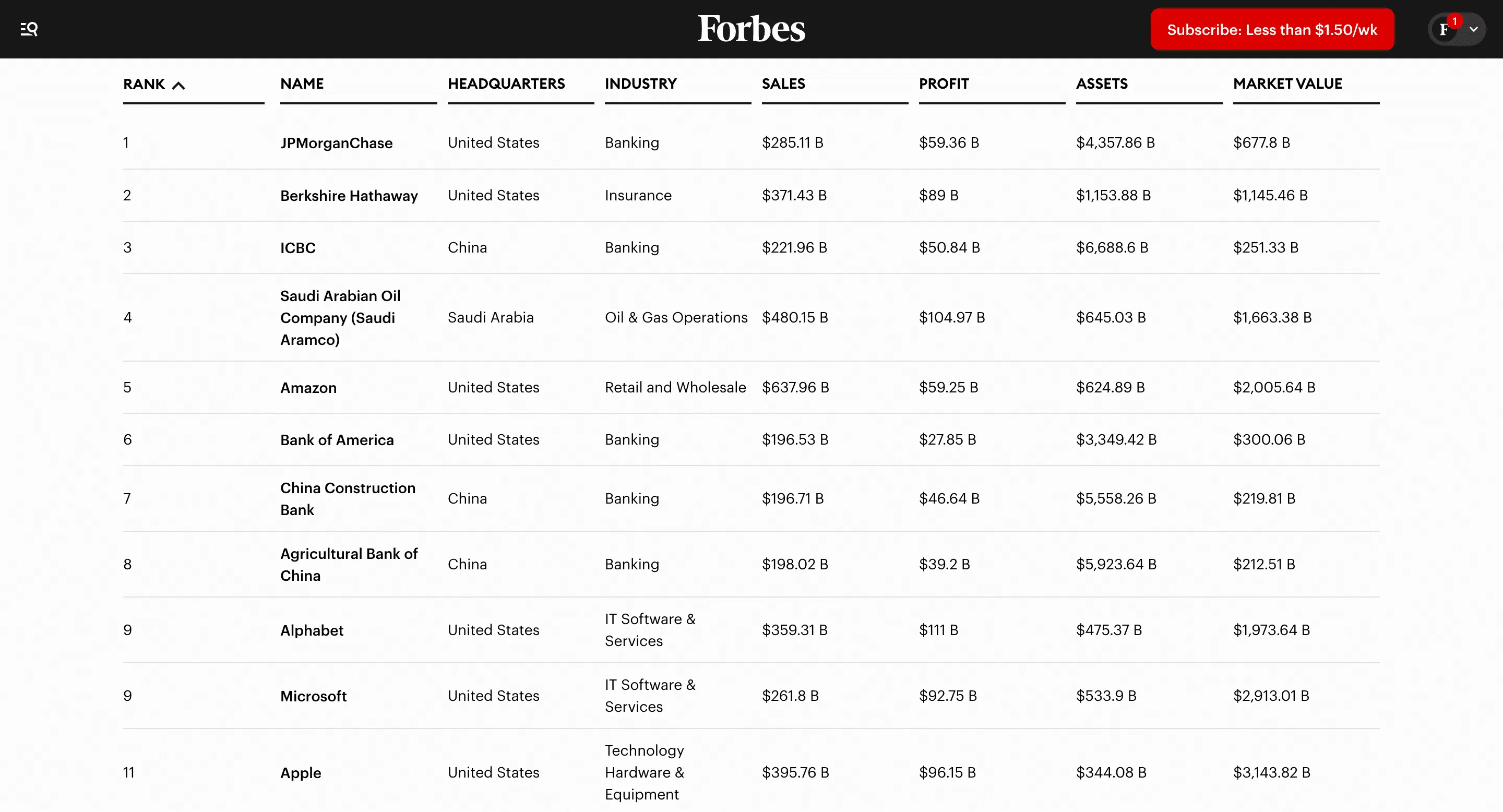
Clura’s Chrome extension includes a Forbes Global 2000 Companies Scraper template that extracts structured ranking and financial data from the currently open Forbes Global 2000 list pages. This template is built for investors, analysts, founders, and enterprise sales teams who explore global company rankings on Forbes and want to convert visible ranking data into clean, structured datasets.
After you navigate to the Global 2000 ranking page and apply filters such as country, industry, or region, the scraper reads the company table or listing cards displayed on the page. You can review and customize which fields are extracted, confirm pagination for navigating across ranking pages, and add additional custom fields if required. Once run, the scraper collects company ranking data across pages, saves everything to your Clura account, and allows export as CSV or JSON for investment research, enterprise prospecting, or benchmarking.
Relevant For
Investors & Equity Analysts
Build structured datasets of the world’s largest public companies for financial and sector analysis.
Enterprise Sales & Business Development Teams
Create targeted outreach lists of large global enterprises by industry or geography.
Strategy & Corporate Development Teams
Benchmark performance metrics and competitive positioning across industries.
Market Researchers & Data Teams
Analyze global company rankings, sector distribution, and revenue patterns.
How to Use
- 1
Open the Forbes Global 2000 list
Go to the Forbes Global 2000 ranking page. Apply filters such as industry, country, or sector if needed.
- 2
Open the Clura extension
Click the Clura Chrome extension icon. Available scraper templates will be displayed.
- 3
Configure the scraper
Select the Forbes Global 2000 Companies Scraper template.Review and confirm:
- 4
Run, save, and export
Run the scraper. Extracted ranking and financial data is saved to your Clura account.Once complete, export the results as CSV or JSON for further analysis.
Fields Scraped
| Field | Type |
|---|---|
| Rank | Text |
| Company Name | Text |
| Headquarters | Text |
| Industry | Text |
| Sales | Text |
| Profits | Text |
| Assets | Text |
| Market Value | Text |
| Company Profile Url | URL |
Export Formats
Example Output
| Rank | Company | Industry | Revenue | Profit | Market Value |
|---|---|---|---|---|---|
| 1 | JPMorgan Chase | Banking | $158B | $37B | $410B |
| 2 | Saudi Aramco | Oil & Gas | $603B | $161B | $2.1T |
Frequently Asked Questions
What data can be scraped from Forbes Global 2000?
You can extract company names, industries, revenues, profits, market value, and rankings.
Can this data be used for market research?
Yes, analysts use Forbes Global 2000 data to study corporate performance and industry trends.
Can the dataset be exported?
Yes, the company data can be exported to CSV, Excel, or JSON.
Related Scrapers
Free Bloomberg company news scraper – Export Data to CSV, Excel & JSON
Scrape company-specific news articles and headlines from Bloomberg company and business section pages, with results saved to your Clura account and exportable as CSV or JSON.
Free CNN News scraper – Export Data to CSV, Excel & JSON
Scrape news article listings and headlines from CNN section and category pages, with results saved to your Clura account and exportable as CSV or JSON.
Free Inc 5000 fast growing startups scraper – Export Data to CSV, Excel & JSON
Scrape company rankings, revenue growth data, and profile details from Inc.’s Fast-Growing Companies (Inc. 5000) lists, with results saved to your Clura account and exportable as CSV or JSON.