
Free Shopify apps scraper – Export Data to CSV, Excel & JSON
Scrape app listing, ratings, and developer data from Shopify App Store search and category pages, with results saved to your Clura account and exportable as CSV or JSON.
Run this templatePricing
Pay once, scrape forever
$29.99 one-time
Unlimited rows & unlimited scrapes
- All Free plan features, plus:
- Unlimited rows per scrape
- Unlimited scrapes per day
- 14-day cloud storage
- Priority support
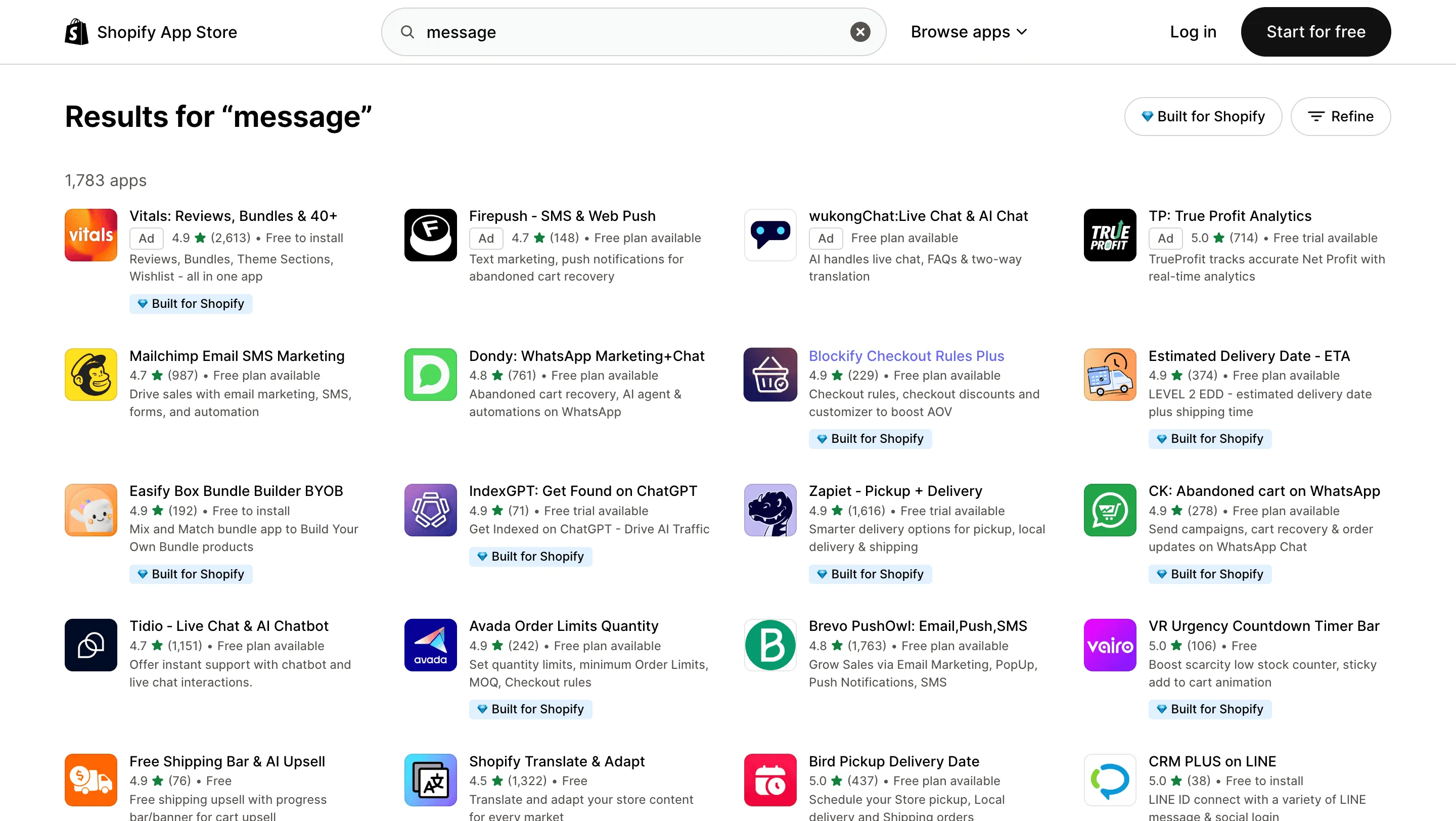
Clura’s Chrome extension includes a Shopify Apps Scraper template that extracts structured app and developer data from the currently open Shopify App Store search and category pages. This template is built for SaaS founders, product marketers, analysts, and agencies who research apps on Shopify and want to convert visible app listings into clean, structured datasets.
After you search for apps using keywords or browse categories such as marketing, shipping, subscriptions, or analytics, the scraper reads the app cards displayed on the page. You can review and customize which fields are extracted, confirm navigation type (pagination or infinite scroll depending on layout), and add additional fields if required. Once run, the scraper collects app listing data across result pages, saves everything to your Clura account, and allows export as CSV or JSON for competitive analysis, partner research, or market mapping.
Relevant For
Shopify App Developers & SaaS Founders
Analyze competing apps by category, pricing model, and reviews before launching or updating your own app.
Product Marketing & Growth Teams
Benchmark pricing tiers, positioning, and feature highlights across top-performing apps.
Agencies & Consultants
Identify high-rated apps and solution partners for client recommendations or partnerships.
Market Researchers & Analysts
Build structured datasets of Shopify apps for category analysis, competitive mapping, or trend tracking.
How to Use
- 1
Set product filters
Define categories, price ranges, brands and keywords to find products to monitor.
- 2
Choose product fields
Select title, price, seller, availability, rating and review count to extract.
- 3
Run & validate
Run the scraper and validate sample rows for accuracy and deduplication.
- 4
Export & schedule
Export results and schedule recurring scrapes for price monitoring and inventory updates.
Fields Scraped
| Field | Type |
|---|---|
| Title | Text |
| Url | URL |
| Rating | Number |
| Review Count | Number |
| Price | Number |
| Description | Text |
Export Formats
Example Output
| Name | Type | Developer | Price | Rating | Review Count | Listing Url |
|---|---|---|---|---|---|---|
| PageFly Landing Page Builder | App | PageFly | Free + Paid | 4.9 | 9800 | https://apps.shopify.com/pagefly |
| Dawn Theme | Theme | Shopify | Free | 4.5 | 2100 | https://themes.shopify.com/themes/dawn |
Frequently Asked Questions
What data can be extracted from Shopify themes and apps listings?
You can extract app or theme names, developer names, pricing plans, ratings, review counts, and listing URLs.
Can this scraper help discover popular Shopify apps?
Yes, it collects top-rated and trending Shopify apps and themes for market research.
Can the data be exported?
Yes, Shopify marketplace data can be exported to CSV, Excel, or JSON.
Related Scrapers
Free Google play store apps scraper – Export Data to CSV, Excel & JSON
Scrape app listing and metadata from Google Play Store search and category pages, with results saved to your Clura account and exportable as CSV or JSON.
Free Apple app store apps scraper – Export Data to CSV, Excel & JSON
Scrape app listing and metadata from Apple App Store search and category pages, with results saved to your Clura account and exportable as CSV or JSON.
Free App annie app rankings scraper – Export Data to CSV, Excel & JSON
Scrape app ranking and leaderboard data from App Annie ranking pages, with results saved to your Clura account and exportable as CSV or JSON.