
Free Walmart product listings scraper – Export Data to CSV, Excel & JSON
Scrape product listing data from Walmart search and category result pages, with results saved to your Clura account and exportable as CSV or JSON.
Run this templatePricing
Pay once, scrape forever
$29.99 one-time
Unlimited rows & unlimited scrapes
- All Free plan features, plus:
- Unlimited rows per scrape
- Unlimited scrapes per day
- 14-day cloud storage
- Priority support
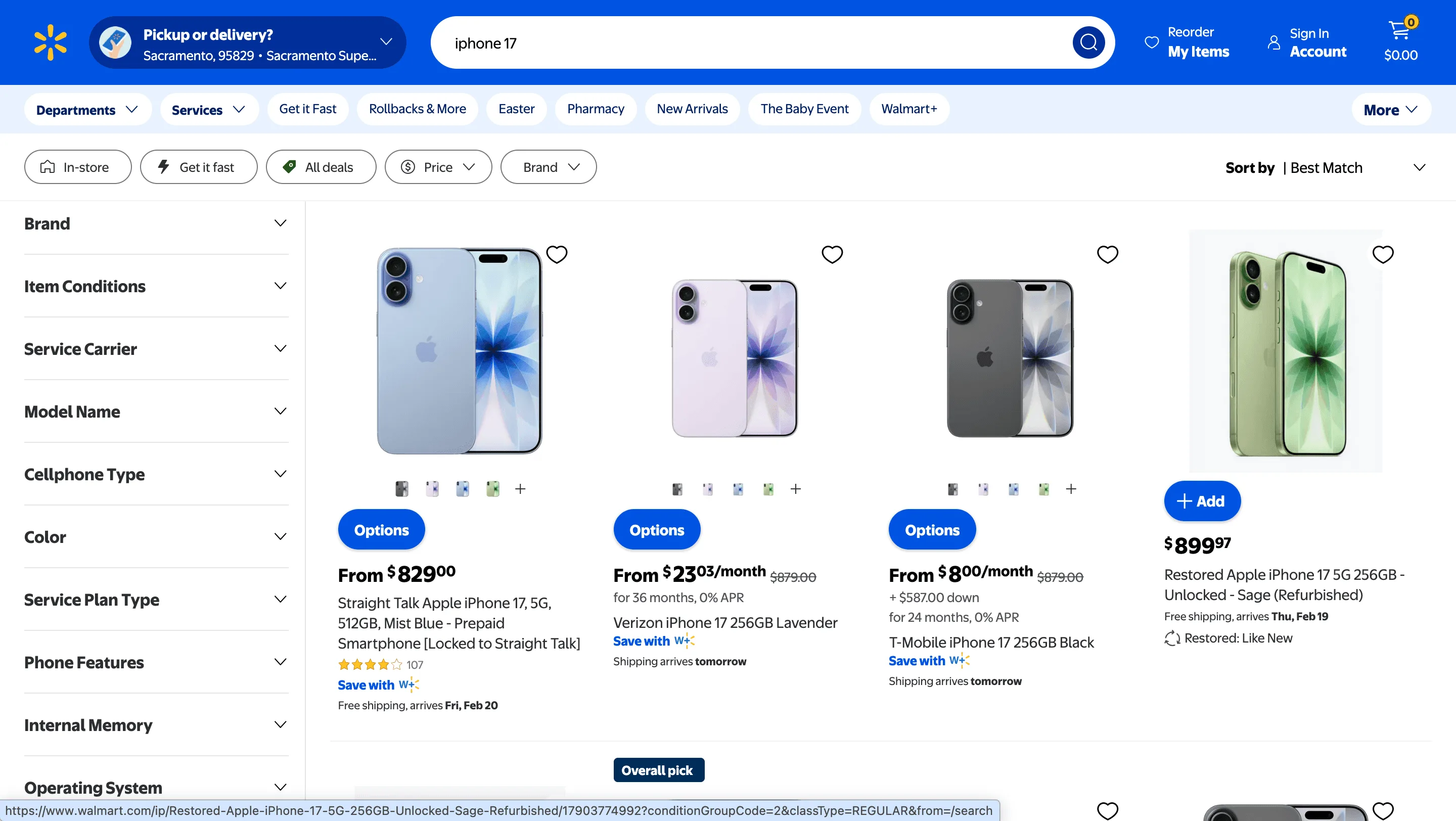
Clura’s Chrome extension includes a Walmart Listings Scraper template that extracts structured product and listing data from the currently open Walmart search and category pages. This template is built for sellers, brand owners, pricing analysts, and researchers who explore products and competitor trends on Walmart and want to convert visible listings into clean, structured datasets.
After you complete a keyword search or browse a product category (for example, electronics, groceries, home goods, or toys), the scraper reads the product cards displayed on the page. You can review and customize which fields are extracted, confirm how the scraper should navigate results (pagination or infinite scroll, depending on the page layout), and add additional fields if required. Once run, the scraper collects listing data across result pages, saves everything to your Clura account, and allows export as CSV or JSON for pricing analysis, competitor benchmarking, or catalog research.
Relevant For
Marketplace Sellers & Brand Owners
Analyze competitor pricing, product positioning, and promotional offers within Walmart categories.
Retail & E-commerce Analysts
Track pricing trends, discount patterns, and category-level competition.
Growth & Merchandising Teams
Study top-performing listings to refine product titles, pricing strategies, and promotions.
Researchers & Data Teams
Build structured Walmart product datasets for market analysis or reporting.
How to Use
- 1
Search or browse on Walmart
Go to Walmart and complete your search or category browsing until the listings match what you want to extract.
- 2
Open the Clura extension
Click the Clura Chrome extension icon. Available scraper templates will be displayed.
- 3
Configure the scraper
Select the Walmart Listings Scraper template.Review and confirm:
- 4
Run, save, and export
Run the scraper. Extracted product data is saved to your Clura account.Once complete, export the results as CSV or JSON for further analysis.
Fields Scraped
| Field | Type |
|---|---|
| Product Title | Text |
| Product Url | URL |
| Price | Number |
| Rating | Number |
| Review Count | Number |
| Condition | Text |
Export Formats
Example Output
| Product Title | Product Url | Price | Brand | Rating | Review Count | Availability |
|---|---|---|---|---|---|---|
| Samsung 55" 4K Smart TV | https://walmart.com/ip/samsung-55 | $498.00 | Samsung | 4.6 | 842 | In Stock |
| Apple AirPods Pro | https://walmart.com/ip/airpods-pro | $199.00 | Apple | 4.8 | 1321 | In Stock |
Frequently Asked Questions
What Walmart data can be extracted?
You can extract product titles, prices, brands, ratings, review counts, availability, and product URLs from Walmart listings.
Can I scrape multiple pages of Walmart listings?
Yes, the scraper can collect product data from paginated search or category results.
What formats can the Walmart data be exported to?
The extracted data can be exported to CSV, Excel, or JSON for further analysis.
Related Scrapers
Free Amazon product listings scraper – Export Data to CSV, Excel & JSON
Scrape product listing data from Amazon search and category result pages, with results saved to your Clura account and exportable as CSV or JSON.
Free Shopify stores scraper – Export Data to CSV, Excel & JSON
Scrape store, product, and brand-level data from Shopify-powered stores you’re browsing, with results saved to your Clura account and exportable as CSV or JSON.
Free Shopify product catalogs scraper – Export Data to CSV, Excel & JSON
Scrape complete product catalog data from Shopify collection and storefront pages, with results saved to your Clura account and exportable as CSV or JSON.