
Free Alibaba supplier listings scraper – Export Data to CSV, Excel & JSON
Scrape supplier and company listing data from Alibaba search and supplier result pages, with results saved to your Clura account and exportable as CSV or JSON.
Run this templatePricing
Pay once, scrape forever
$29.99 one-time
Unlimited rows & unlimited scrapes
- All Free plan features, plus:
- Unlimited rows per scrape
- Unlimited scrapes per day
- 14-day cloud storage
- Priority support
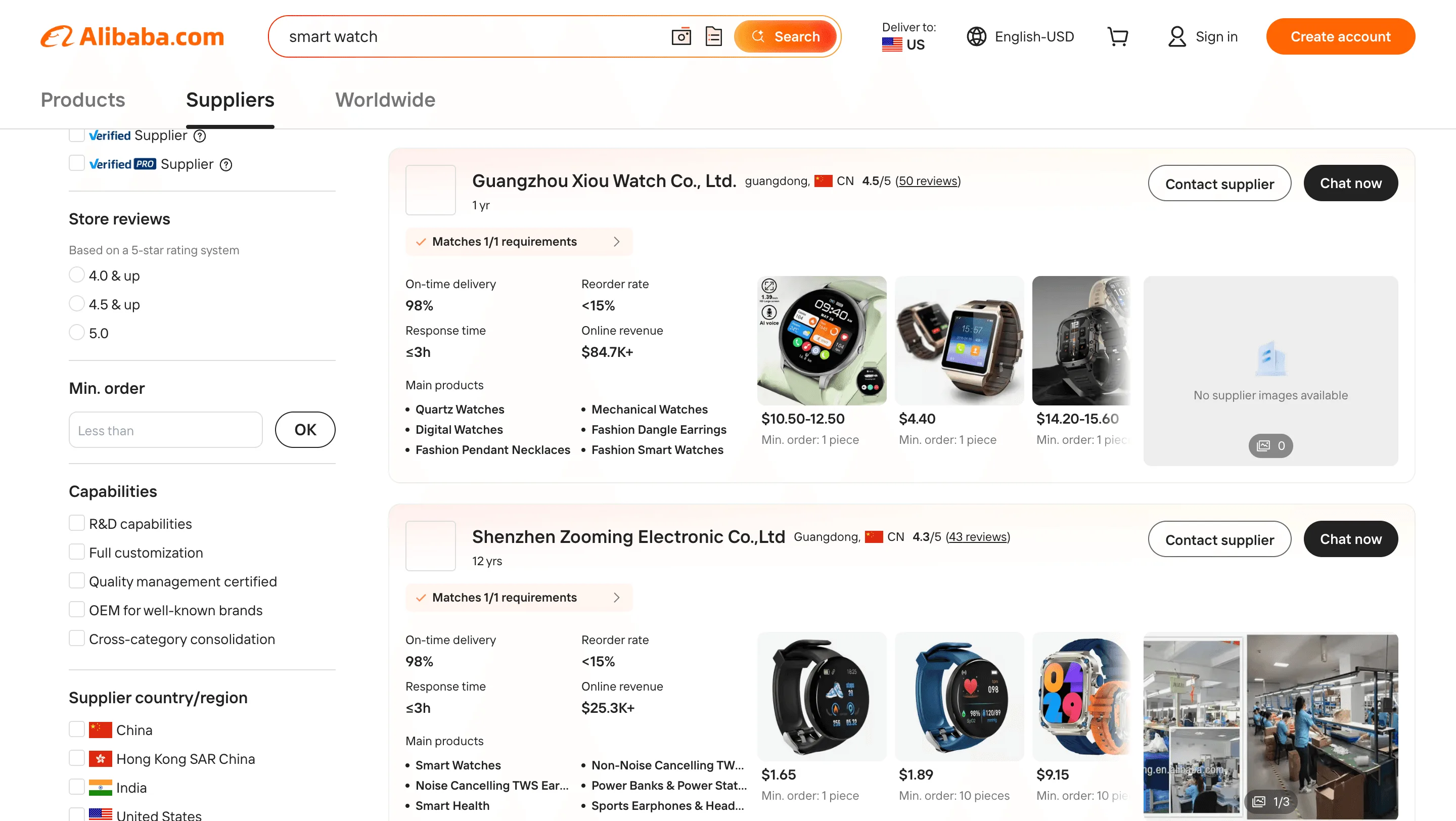
Clura’s Chrome extension includes an Alibaba Supplier Listings Scraper template that extracts structured supplier and company data from the currently open Alibaba supplier search and listing pages. This template is built for sourcing managers, importers, brand owners, and researchers who explore manufacturers and suppliers on Alibaba and want to convert visible supplier listings into clean, structured datasets.
After you complete a supplier search using filters such as product category, country/region, minimum order quantity (MOQ), certifications, or years in business, the scraper reads the supplier cards displayed on the page. You can review and customize which fields are extracted, confirm pagination for navigating across result pages, and add additional fields if required. Once run, the scraper collects supplier data across pages, saves everything to your Clura account, and allows export as CSV or JSON for sourcing analysis, supplier comparison, or outreach planning.
Relevant For
Sourcing Managers & Procurement Teams
Build structured shortlists of manufacturers based on region, certifications, and product category.
E-commerce & Private Label Sellers
Identify and compare potential suppliers for new product launches.
Founders & Brand Owners
Research supplier capabilities, factory scale, and trade history before initiating contact.
Market Researchers & Analysts
Analyze supplier density, geographic clusters, and category-level manufacturing trends.
How to Use
- 1
Search suppliers on Alibaba
Go to Alibaba and complete your supplier search using relevant keywords and filters such as country, certifications, or years in business.
- 2
Open the Clura extension
Click the Clura Chrome extension icon. Available scraper templates will be displayed.
- 3
Configure the scraper
Select the Alibaba Supplier Listings Scraper template.Review and confirm:
- 4
Run, save, and export
Run the scraper. Extracted supplier data is saved to your Clura account.Once complete, export the results as CSV or JSON for further analysis.
Fields Scraped
| Field | Type |
|---|---|
| Supplier Name | Text |
| Location | Text |
| Rating | Number |
| Years In Business | Text |
| Review Count | Number |
| Product Title | Text |
| Product Url | URL |
| Price | Number |
| Minimum Order Quantity | Text |
Export Formats
Example Output
| Supplier Name | Location | Rating | Years In Business | Review Count | Product Title | Product Url | Price | Minimum Order Quantity |
|---|---|---|---|---|---|---|---|---|
| Shenzhen TechMakers Co. | Shenzhen, China | 4.8 | 8 yrs | 312 | Wireless Bluetooth Earbuds OEM | https://alibaba.com/product/wireless-earbuds-oem | $3.50–$6.00 | 500 units |
| Guangzhou EliteMold Factory | Guangzhou, China | 4.6 | 5 yrs | 187 | Custom Silicone Phone Cases | https://alibaba.com/product/silicone-phone-case | $0.80–$1.50 | 1000 units |
Frequently Asked Questions
What data does this scraper extract from Alibaba?
It captures supplier name, location, rating, years in business, review count, product title, product URL, price, and minimum order quantity (MOQ) for each supplier or listing on the page.
Can I filter suppliers by country or certification before scraping?
Yes. Apply Alibaba's supplier filters for country, trade assurance, certifications, years in business, and response rate before running Clura to narrow results to verified suppliers.
Does it capture the minimum order quantity (MOQ)?
Yes. MOQ is extracted alongside pricing for each supplier listing, which is essential for sourcing decisions and comparing production costs at different scales.
Can I use this to build a supplier comparison sheet?
Yes. Export supplier data into CSV or Excel and compare ratings, MOQs, pricing, and location side-by-side to shortlist the most suitable manufacturers for your product.
How do I export Alibaba supplier data?
All scraped data is saved to your Clura account and can be exported as CSV, Excel, Google Sheets, or JSON for sourcing analysis or outreach planning.
Related Scrapers
Free Amazon product listings scraper – Export Data to CSV, Excel & JSON
Scrape product listing data from Amazon search and category result pages, with results saved to your Clura account and exportable as CSV or JSON.
Free Ebay listings scraper – Export Data to CSV, Excel & JSON
Scrape product listing data from eBay search and category result pages, with results saved to your Clura account and exportable as CSV or JSON.
Free Walmart product listings scraper – Export Data to CSV, Excel & JSON
Scrape product listing data from Walmart search and category result pages, with results saved to your Clura account and exportable as CSV or JSON.