
Free Similarweb site metrics scraper – Export Data to CSV, Excel & JSON
Scrape website traffic, engagement, and source metrics from Similarweb website overview pages, with results saved to your Clura account and exportable as CSV or JSON.
Run this templatePricing
Pay once, scrape forever
$29.99 one-time
Unlimited rows & unlimited scrapes
- All Free plan features, plus:
- Unlimited rows per scrape
- Unlimited scrapes per day
- 14-day cloud storage
- Priority support
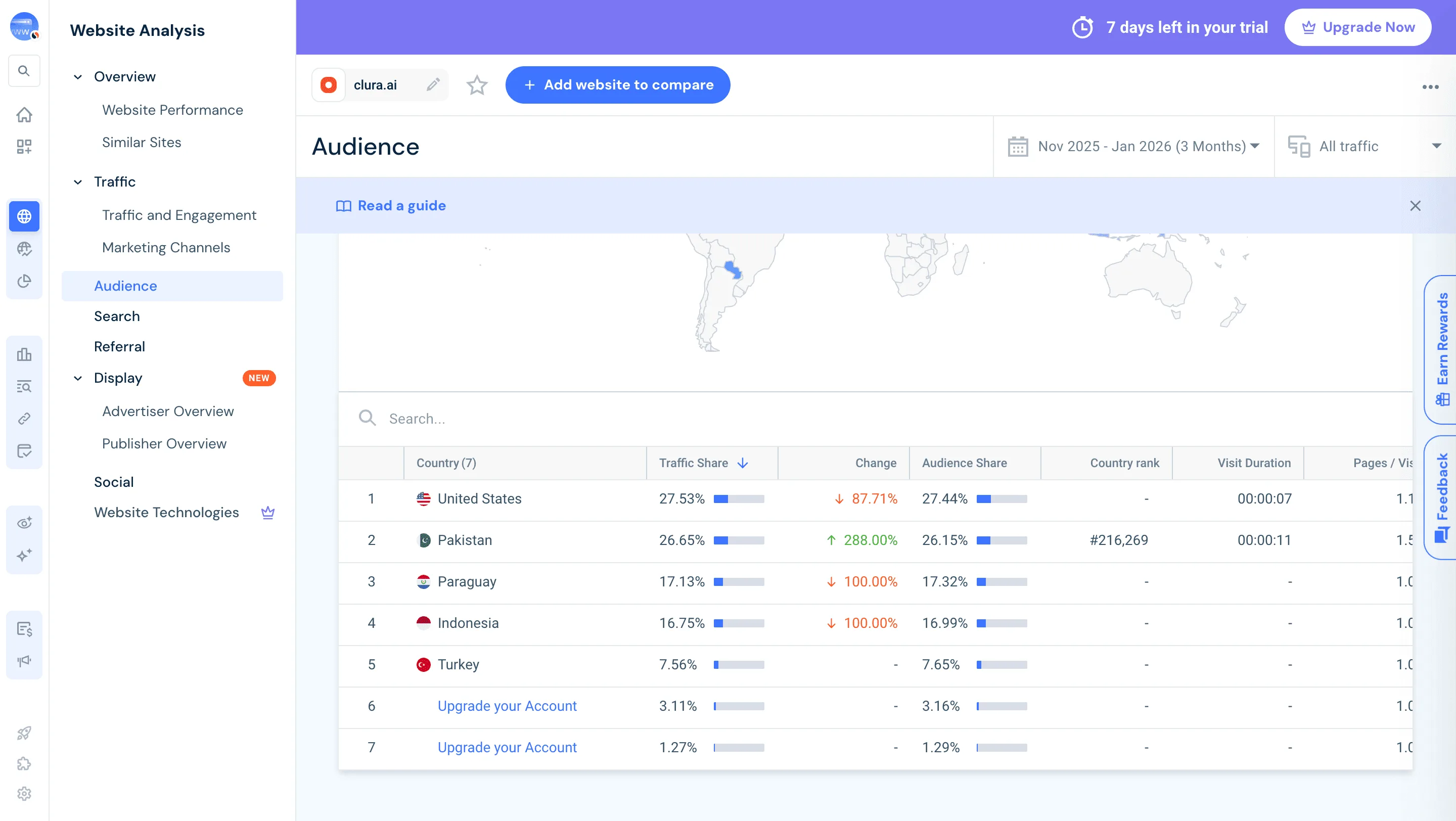
Clura’s Chrome extension includes a Similarweb Metrics Scraper template that extracts structured traffic and engagement data from the currently open Similarweb website overview and analytics pages. This template is designed for growth teams, investors, founders, and analysts who evaluate website performance on Similarweb and want to convert visible metrics into clean, structured datasets.
After you search for a domain and open its overview page in Similarweb, the scraper reads the traffic and engagement metrics displayed on screen. You can review and customize which fields are extracted, add additional custom fields if required, and run the scraper to collect structured data. Once extraction is complete, all results are saved to your Clura account and can be exported as CSV or JSON for benchmarking, reporting, or competitive analysis.
Relevant For
Growth & Marketing Teams
Benchmark competitor traffic, acquisition channels, and engagement trends to inform strategy.
Investors & Analysts
Evaluate website performance and growth signals before investment decisions.
Founders & Strategy Teams
Monitor competitor performance and identify opportunities in traffic sources or audience segments.
Market Researchers & Data Teams
Build structured datasets of website performance metrics for comparative analysis or reporting.
How to Use
- 1
Open a website overview on Similarweb
Go to Similarweb and search for a domain. Open the website’s overview or traffic analytics page.
- 2
Open the Clura extension
Click the Clura Chrome extension icon. Available scraper templates will be displayed.
- 3
Configure the scraper
Select the Similarweb Metrics Scraper template.Review and confirm:
- 4
Run, save, and export
Run the scraper. Extracted metrics are saved to your Clura account.Once complete, export the results as CSV or JSON for further analysis.
Fields Scraped
| Field | Type |
|---|---|
| Country | Number |
| Traffic Share | Text |
| Traffic Share Change | Text |
| Audience Share | Text |
| Country Rank | Number |
| Visit Duration | Text |
| Pages Per Visit | URL |
| Bounce Rate | Text |
Export Formats
Example Output
| Website | Monthly Visits | Global Rank | Avg Visit Duration | Bounce Rate |
|---|---|---|---|---|
| example.com | 5.2M | 1245 | 3m 45s | 42% |
| startup.io | 850K | 8321 | 2m 18s | 51% |
Frequently Asked Questions
What SimilarWeb data can be extracted?
You can extract website traffic estimates, rankings, traffic sources, and engagement metrics.
Can this be used for competitor analysis?
Yes, SimilarWeb data helps analyze competitors' website traffic performance.
Can the data be exported?
Yes, the extracted metrics can be exported to CSV or Excel.
Related Scrapers
Free Producthunt launches scraper – Export Data to CSV, Excel & JSON
Scrape product launch data from Product Hunt launch and leaderboard pages, with results saved to your Clura account and exportable as CSV or JSON.
Free Builtwith tech stack scraper – Export Data to CSV, Excel & JSON
Scrape website technology stack and infrastructure data from BuiltWith website profile pages, with results saved to your Clura account and exportable as CSV or JSON.
Free Builtwith e-commerce stores scraper – Export Data to CSV, Excel & JSON
Extract structured data from this source quickly and efficiently.