
Free Crunchbase companies scraper – Export Data to CSV, Excel & JSON
Extracts structured company and funding data from Crunchbase company search result pages using pagination and saves it to your Clura account with CSV and JSON export.
Run this templatePricing
Pay once, scrape forever
$29.99 one-time
Unlimited rows & unlimited scrapes
- All Free plan features, plus:
- Unlimited rows per scrape
- Unlimited scrapes per day
- 14-day cloud storage
- Priority support
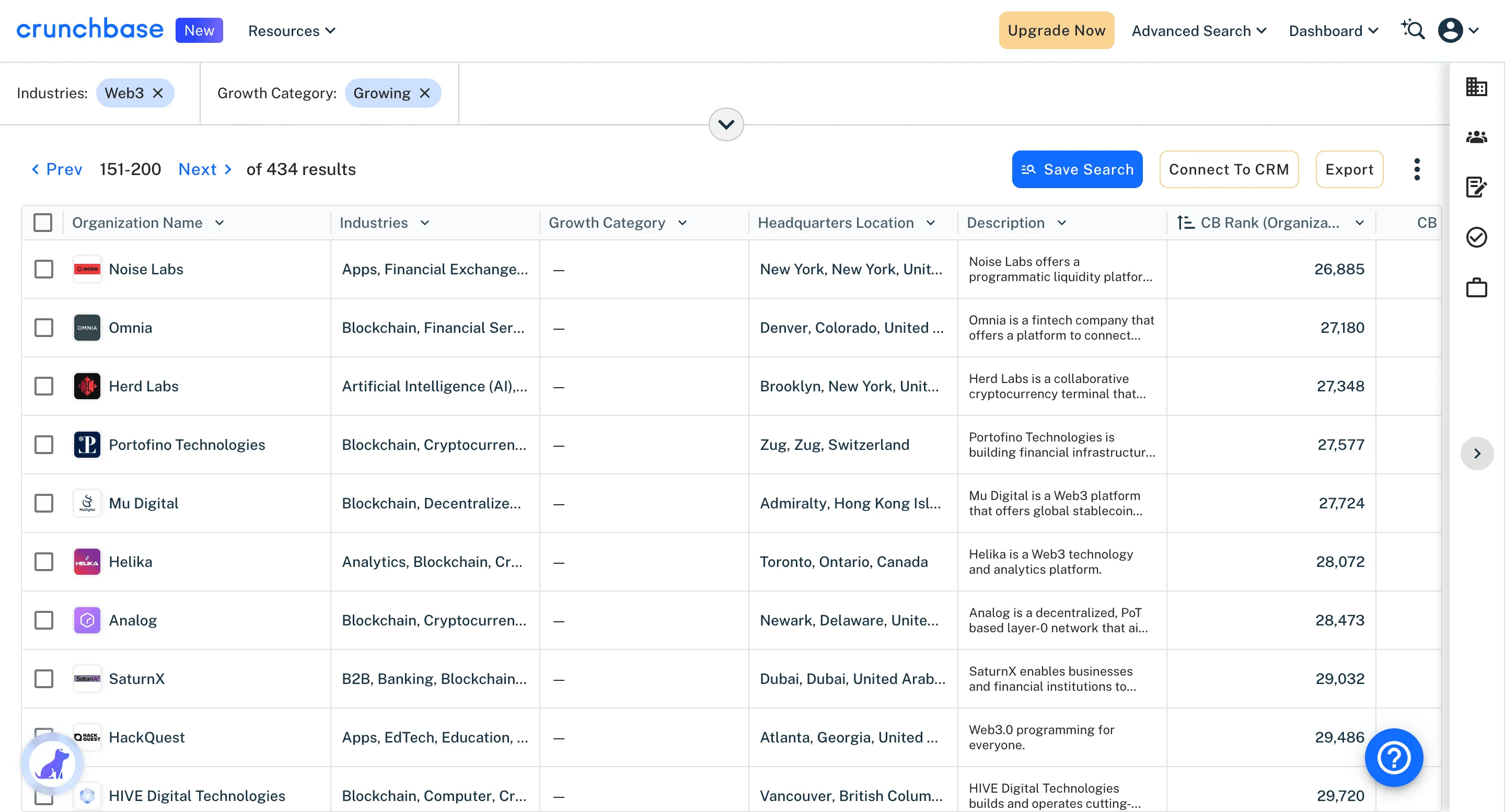
Clura’s Chrome extension includes a Crunchbase Companies Scraper template that extracts structured company data from the currently open Crunchbase company search and discovery pages. This template is designed for users who actively research companies on Crunchbase and want to convert visible search results into clean, usable datasets.
Once you apply filters such as industry, funding stage, location, employee count, or founding year, the scraper reads the company cards displayed on the page. It supports pagination, allowing the template to move through multiple result pages and collect company data across the entire result set. All scraped results are automatically saved to your Clura account and can be exported as CSV or JSON for downstream analysis, reporting, or integrations.
Relevant For
Founders & Operators
Research competitors, potential partners, or acquisition targets by analyzing companies by industry, size, and funding stage.
Sales & Business Development Teams
Build targeted account lists using funding activity, company size, or growth-stage signals.
Investors & VC Analysts
Discover startups by sector, geography, or funding stage and track emerging companies for deal sourcing.
Market Researchers & Analysts
Create structured datasets for ecosystem mapping, competitive intelligence, or market trend analysis.
How to Use
- 1
Open Crunchbase company search
Navigate to the Companies search or discovery section on Crunchbase and apply filters such as industry, funding stage, location, or employee count.
- 2
Confirm pagination
Ensure the search results use pagination and select the 'Next' button so the scraper can move across multiple pages.
- 3
Run the scraper template
Click the Clura Chrome extension icon and select the Crunchbase Companies Scraper template to begin extraction.
- 4
Save and export
Scraped company data is saved to your Clura account and can be exported as CSV or JSON whenever needed.
Fields Scraped
| Field | Type |
|---|---|
| Company Name | Text |
| Website | URL |
| Funding | Number |
| Funding Type | Number |
| Industry | Text |
| Headquarters | Text |
| Employees | Number |
| Launch Date | Date |
| Description | Text |
| Location | Text |
| Rating | Number |
| Review Count | Number |
Export Formats
Example Output
| Company Name | Website | Funding | Funding Type | Industry | Headquarters | Employees | Launch Date | Description | Location | Rating | Review Count |
|---|---|---|---|---|---|---|---|---|---|---|---|
| Linear | linear.app | $35M | Series B | Developer Tools | San Francisco, CA | 51-200 | 2019 | Modern issue tracking and project management for engineering teams | San Francisco, CA | 4.8 | 412 |
| Retool | retool.com | $145M | Series C | Enterprise Software | San Francisco, CA | 201-500 | 2017 | Low-code platform for building internal business tools fast | San Francisco, CA | 4.6 | 389 |
Frequently Asked Questions
What data does this scraper extract from Crunchbase?
It captures company name, website, total funding amount, funding type, industry, headquarters, employee count, founding date, and business description from Crunchbase company listings.
Can I filter companies by funding stage or industry?
Yes. Use Crunchbase's search filters to narrow by industry, funding stage, geography, or employee count before running Clura for targeted results.
Is this useful for investor research and deal sourcing?
Yes. VCs and angels can track startups raising in target sectors and stages, and build structured pipelines from Crunchbase search results.
Can I monitor recently funded companies?
Yes. Filter Crunchbase by recent funding announcements and run the scraper periodically to build an up-to-date dataset of funded startups.
How do I export the scraped company data?
All data is saved to your Clura account and can be exported as CSV, Excel, Google Sheets, or JSON for analysis or integration.
Related Scrapers
Free Linkedin companies scraper – Export Data to CSV, Excel & JSON
Extracts structured company data from LinkedIn Company Search result pages using pagination and saves it to your Clura account with CSV export.
Free Zoominfo contacts scraper – Export Data to CSV, Excel & JSON
Scrape contact and company data from ZoomInfo People Search result pages, with results saved to your Clura account and exportable as CSV or JSON.
Free Crunchbase funding events scraper – Export Data to CSV, Excel & JSON
Scrape funding round and investment event data from Crunchbase funding and discovery pages, with results saved to your Clura account and exportable as CSV or JSON.