
Free Zoominfo contacts scraper – Export Data to CSV, Excel & JSON
Scrape contact and company data from ZoomInfo People Search result pages, with results saved to your Clura account and exportable as CSV or JSON.
Run this templatePricing
Pay once, scrape forever
$29.99 one-time
Unlimited rows & unlimited scrapes
- All Free plan features, plus:
- Unlimited rows per scrape
- Unlimited scrapes per day
- 14-day cloud storage
- Priority support
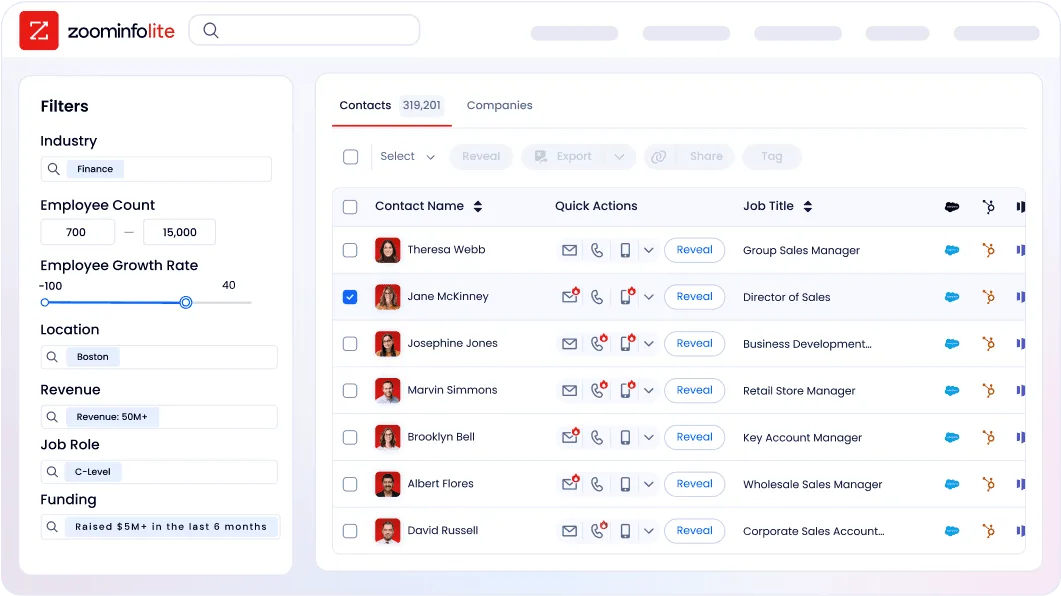
Clura’s Chrome extension includes a ZoomInfo Contacts Scraper template that extracts structured contact data from the currently open ZoomInfo People Search result pages. This template is designed for sales, recruiting, and growth teams who research prospects on ZoomInfo and want to convert visible search results into clean, structured datasets.
Once you finish applying filters such as job title, department, seniority, company size, industry, or location, the scraper reads the contact cards displayed on the page. You can review and customize which fields are extracted, confirm the navigation type (pagination), and add additional fields if needed. The scraper then navigates through result pages, extracts the data, and saves everything to your Clura account. You can export the results as CSV or JSON for outreach, CRM uploads, enrichment, or analysis.
Relevant For
Sales Development & Outbound Teams
Build targeted prospect lists by scraping contacts filtered by role, seniority, industry, and company size.
Recruiters & Talent Sourcers
Extract candidate or hiring manager profiles for sourcing pipelines and outreach.
Founders & Early-stage Sales Teams
Research prospects manually and convert qualified ZoomInfo searches into structured datasets.
RevOps & Growth Teams
Create clean contact datasets for segmentation, enrichment, routing, or reporting.
How to Use
- 1
Search on ZoomInfo
Go to ZoomInfo and complete your People Search by applying the relevant filters until the results match your target audience.
- 2
Open the Clura extension
Click the Clura Chrome extension icon. Available scraper templates will be displayed.
- 3
Configure the scraper
Select the ZoomInfo Contacts Scraper template.Review and confirm:
- 4
Run, save, and export
Run the scraper. Extracted contact data is saved to your Clura account.Once complete, export the results as CSV or JSON for further analysis or integration.
Fields Scraped
| Field | Type |
|---|---|
| Text | |
| Full Name | Text |
| Company Name | Text |
| Job Title | Text |
| Linkedin Profile | URL |
| Phone | Text |
| Website | URL |
| Location | Text |
| Description | Text |
| Rating | Number |
| Review Count | Number |
Export Formats
Example Output
| Full Name | Company Name | Job Title | Linkedin Profile | Phone | Website | Location | Description | Rating | Review Count | |
|---|---|---|---|---|---|---|---|---|---|---|
| rachel@cloudbase.ai | Rachel Morgan | Cloudbase AI | Chief Technology Officer | https://linkedin.com/in/rachel-morgan | +1-650-555-0422 | cloudbase.ai | Palo Alto, CA | Cloud infrastructure for modern enterprises | 4.6 | 184 |
| mark@pivotworks.com | Mark Jensen | PivotWorks | VP of Sales | https://linkedin.com/in/mark-jensen | +1-312-555-0987 | pivotworks.com | Chicago, IL | B2B sales enablement platform | 4.4 | 217 |
Frequently Asked Questions
What data does this scraper extract from ZoomInfo?
It captures email, full name, company name, job title, LinkedIn profile URL, phone number, website, location, and business description for each contact in the results.
Do I need a ZoomInfo subscription to use this?
Yes. You must be logged into ZoomInfo with an active plan and have your search results open in Chrome before running the Clura extension.
Can I target decision-makers by title or department?
Yes. Use ZoomInfo's native filters for job title, department, seniority, company size, or industry before scraping to narrow results.
Is using this scraper compliant with ZoomInfo's terms?
Clura captures only data you are licensed to view under your ZoomInfo plan. Always verify your use case aligns with your data provider agreement.
Can I export contacts to a spreadsheet or CRM?
Yes. Export scraped contacts to CSV or Excel from Clura and import them into any CRM or outreach tool.
Related Scrapers
Free Linkedin profiles scraper – Export Data to CSV, Excel & JSON
Extracts structured profile data from LinkedIn People Search result pages using pagination and saves it to your Clura account with CSV export.
Free Apollo.io leads scraper – Export Data to CSV, Excel & JSON
Extracts lead and company data from the currently open Apollo leads or people search page and saves it to your Clura account with CSV export.
Free Crunchbase companies scraper – Export Data to CSV, Excel & JSON
Extracts structured company and funding data from Crunchbase company search result pages using pagination and saves it to your Clura account with CSV and JSON export.