
Free Linkedin companies scraper – Export Data to CSV, Excel & JSON
Extracts structured company data from LinkedIn Company Search result pages using pagination and saves it to your Clura account with CSV export.
Run this templatePricing
Pay once, scrape forever
$29.99 one-time
Unlimited rows & unlimited scrapes
- All Free plan features, plus:
- Unlimited rows per scrape
- Unlimited scrapes per day
- 14-day cloud storage
- Priority support
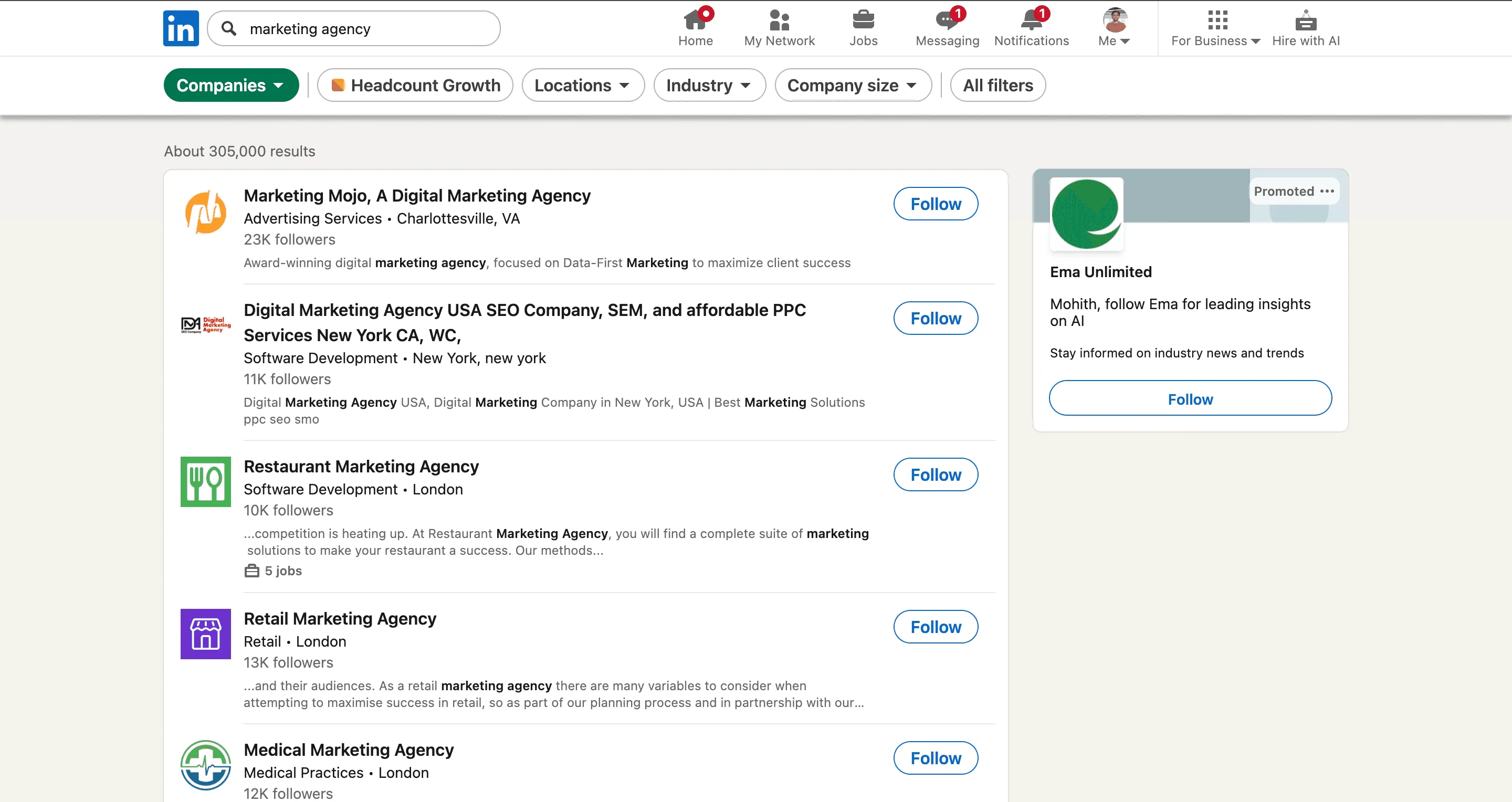
The LinkedIn Companies Scraper by Clura is a Chrome extension that works on the currently open LinkedIn Company Search results pages and converts visible company cards into clean, structured data. It is built for founders, sales teams, marketers, and researchers who actively explore companies on LinkedIn and want to capture firmographic insights directly from search results.
After you apply filters such as industry, company size, location, or growth signals, Clura extracts the company information displayed on each search result card. The scraper supports pagination, allowing it to automatically navigate through multiple result pages and collect data across the full result set. All scraped data is saved to your Clura account and can be exported as a CSV for lead generation, market research, competitive analysis, or enrichment workflows.
Relevant For
Sales & Business Development Teams
Build targeted account lists by scraping companies filtered by industry, size, and geography for outbound or ABM strategies.
Founders & Operators
Identify potential customers, partners, or competitors by analyzing companies within a specific niche or region.
Marketers & Growth Teams
Research companies for partnerships, sponsorships, or campaign targeting based on firmographic attributes.
Researchers & Analysts
Create structured datasets of companies for market mapping, competitive intelligence, or industry analysis.
How to Use
- 1
Configure your search
Search for companies from LinkedIn
- 2
Open LinkedIn Company Search
Go to LinkedIn and switch to Company Search. Apply filters such as industry, company size, and location.
- 3
Run the scraper
Click the Clura Chrome extension icon. Clura extracts profile data from the current page and moves through paginated results automatically.
- 4
Save and export
All scraped data is saved to your Clura account and can be exported as a CSV for further use.
Fields Scraped
| Field | Type |
|---|---|
| Text | |
| Full Name | Text |
| Company Name | Text |
| Job Title | Text |
| Linkedin Profile | URL |
| Phone | Text |
| Website | URL |
| Location | Text |
| Description | Text |
| Rating | Number |
| Review Count | Number |
Export Formats
Example Output
| Full Name | Company Name | Job Title | Linkedin Profile | Phone | Website | Location | Description | Rating | Review Count | |
|---|---|---|---|---|---|---|---|---|---|---|
| john@acmecorp.com | John Carter | Acme Corp | VP of Sales | https://linkedin.com/in/john-carter | +1-415-555-0100 | acmecorp.com | San Francisco, CA | Enterprise B2B SaaS platform | 4.5 | 238 |
| sarah@nexify.io | Sarah Bloom | Nexify | Head of Marketing | https://linkedin.com/in/sarah-bloom | +1-212-555-0200 | nexify.io | New York, NY | AI-powered marketing automation | 4.3 | 192 |
Frequently Asked Questions
What data does this scraper extract from LinkedIn Company pages?
It captures email, full name, company name, job title, LinkedIn profile URL, phone number, website, location, and business description from company employee listings.
Is this useful for B2B lead generation?
Yes. This template is designed for B2B sales and marketing teams to build structured contact lists directly from LinkedIn company pages.
Can I scrape multiple companies in one session?
Navigate to each company's employee or about page and run the scraper separately per company for best results.
How do I get the contacts into my CRM?
Export as CSV or JSON from Clura, then import directly into Salesforce, HubSpot, Pipedrive, or any CRM that accepts CSV uploads.
Does it work for companies of all sizes?
Yes, from early-stage startups to large enterprises, as long as the company page is accessible on LinkedIn.
Related Scrapers
Free Crunchbase companies scraper – Export Data to CSV, Excel & JSON
Extracts structured company and funding data from Crunchbase company search result pages using pagination and saves it to your Clura account with CSV and JSON export.
Free Zoominfo contacts scraper – Export Data to CSV, Excel & JSON
Scrape contact and company data from ZoomInfo People Search result pages, with results saved to your Clura account and exportable as CSV or JSON.
Free Angellist startups scraper – Export Data to CSV, Excel & JSON
Scrape startup and company data from AngelList startup search pages, with results saved to your Clura account and exportable as CSV or JSON.