
Free Angellist startups scraper – Export Data to CSV, Excel & JSON
Scrape startup and company data from AngelList startup search pages, with results saved to your Clura account and exportable as CSV or JSON.
Run this templatePricing
Pay once, scrape forever
$29.99 one-time
Unlimited rows & unlimited scrapes
- All Free plan features, plus:
- Unlimited rows per scrape
- Unlimited scrapes per day
- 14-day cloud storage
- Priority support
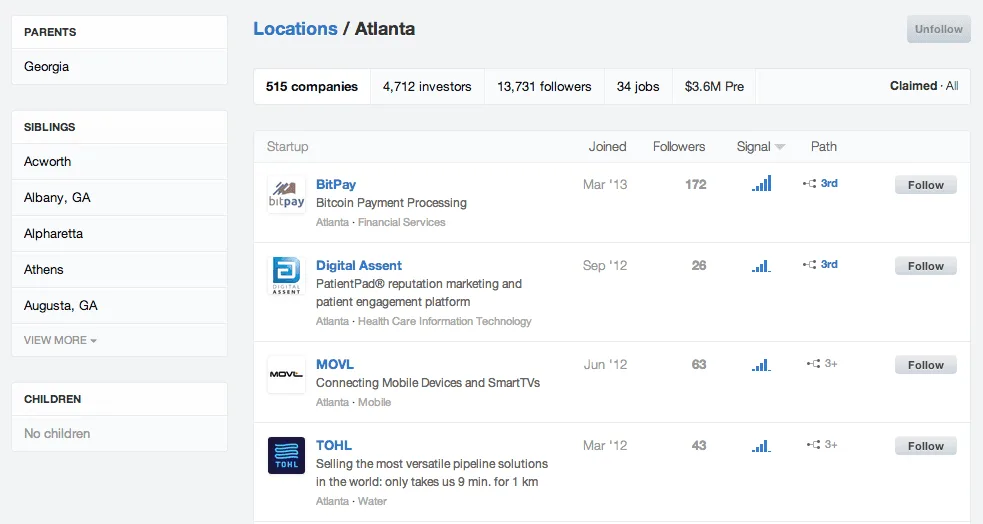
Clura’s Chrome extension includes an AngelList Startups Scraper template that extracts structured startup data from the currently open AngelList startup search and discovery pages. This template is designed for users who explore early-stage companies on AngelList and want to convert visible startup listings into clean, structured datasets.
After you finish filtering startups by market, stage, location, company size, or traction signals, the scraper reads the startup cards displayed on the page. You can review and customize which fields are extracted, confirm pagination for navigating across result pages, and add additional fields if required. Once run, the scraper collects startup data across pages, saves everything to your Clura account, and allows export as CSV or JSON for sourcing, market research, or investment analysis.
Relevant For
Investors & VC Analysts
Discover early-stage startups by sector, geography, or traction for deal sourcing.
Founders & Operators
Research competitors, similar startups, or potential partners within a specific niche.
Recruiters & Talent Teams
Identify fast-growing startups that are actively hiring for sourcing or partnerships.
Market Researchers & Analysts
Build structured datasets of startups for ecosystem mapping, trend analysis, or reporting.
How to Use
- 1
Search startups on AngelList
Go to AngelList and complete your startup search by applying filters such as market, stage, location, or company size.
- 2
Open the Clura extension
Click the Clura Chrome extension icon. Available scraper templates will be shown.
- 3
Configure the scraper
Select the AngelList Startups Scraper template.Review and confirm:
- 4
Run, save, and export
Run the scraper. Extracted startup data is saved to your Clura account.Once complete, export the results as CSV or JSON for further analysis.
Fields Scraped
| Field | Type |
|---|---|
| Company Name | Text |
| Website | URL |
| Industry | Text |
| Location | Text |
| Company Size | Text |
| Founded Year | Date |
| Funding Stage | Number |
| Total Funding Amount | Number |
Export Formats
Example Output
| Company Name | Website | Industry | Location | Company Size | Founded Year | Funding Stage | Total Funding Amount |
|---|---|---|---|---|---|---|---|
| Harvest AI | harvestai.com | AgriTech | Austin, TX | 11-50 | 2022 | Seed | $3.5M |
| Nomad Finance | nomadfinance.io | Fintech | New York, NY | 1-10 | 2023 | Pre-Seed | $1.2M |
Frequently Asked Questions
What data does this scraper extract from AngelList?
It captures company name, website, industry, location, company size, founding year, funding stage, and total funding amount for each startup listing.
Can I filter startups by funding stage or industry?
Yes. Use AngelList's built-in filters for funding stage, industry, geography, or company size before running Clura to target the right companies.
Is this useful for early-stage investor research?
Yes. Angels and seed-stage VCs use it to discover pre-seed and seed startups in target sectors and track their funding status.
Can I export startup data to a spreadsheet?
Yes. Export to CSV, Excel, Google Sheets, or JSON from your Clura account at any time.
How does AngelList data complement Crunchbase for research?
AngelList focuses more on early-stage startups and job listings, while Crunchbase covers a broader funding data set — using both gives a more complete view.
Related Scrapers
Free Linkedin companies scraper – Export Data to CSV, Excel & JSON
Extracts structured company data from LinkedIn Company Search result pages using pagination and saves it to your Clura account with CSV export.
Free Crunchbase companies scraper – Export Data to CSV, Excel & JSON
Extracts structured company and funding data from Crunchbase company search result pages using pagination and saves it to your Clura account with CSV and JSON export.
Free Producthunt launches scraper – Export Data to CSV, Excel & JSON
Scrape product launch data from Product Hunt launch and leaderboard pages, with results saved to your Clura account and exportable as CSV or JSON.